
|
|
Pima County Geographic Information Systems
Pictometry Aerial Photos
|

Aerial photos described here are from EagleView,
also known as Pictometry.
Pictometry specializes in oblique aerial photography and includes orthophoto views as well.
See About Pictometry Aerial Photos for more.
- Read the Disclaimer
and be aware of GIS Overlay Inaccuracies on Pictometry Oblique Photos.
Also learn about Printing Pictometry Aerial Photos .
- Select one of these methods to start the Pictometry Viewer and find photos:
|
PimaMaps
|
Navigate or zoom in to the area you want on a PimaMaps map.
Then use one of these techniques:
-
Pick the "Custom Tools" toolbar tab followed by the "Oblique Aerial Photos" tool.
Then pick a point on the map to show in the photos.
This method lets you pick the exact point to center the initial photo display.
-
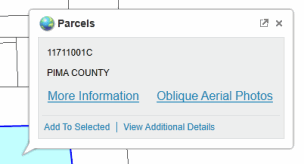
Hold the mouse cursor over a parcel to display the parcel's map tip.
Then pick the "Oblique Aerial Photos" link in the map tip.
This method centers the inital photo display in the middle of the parcel.
-
You can also pick the "More Information" link in the parcel map tip to show the
"parcel detail page" of information and links for the parcel.
See the "Oblique Aerial Photos" section on that page with both Pictometry Photos and Bing Maps Photos links to the photos for that parcel area.
|
|
Parcel Information Search
|
Start with Parcel Information Search
to search for a parcel by taxpayer name, street address or parcel code.
This displays a "parcel detail page" of information and links for each parcel the search finds.
As with clicking "More Information" in a PimaMaps parcel map tip, the parcel detail page has an "Oblique Aerial Photos" section
with both Pictometry Photos and Bing Maps Photos links to the photos for that parcel.
|
Pictometry Orthophoto Tile Photos
Orthophoto tile photos are not the primary Pictometry oblique or angled photos.
Orthophoto tiles are large files intended primarily for technical users.
Tile cell and sector sizes and limitations
- For year 2020 and beyond, each Pictometry Orthophoto Tile photo covers approximately 1/4 square mile and displays about one-half mile on each side.
These grid tile cells are not coincident or aligned with PLSS section boundaries or prior year Pictometry sectors in any way.
- For years 2008 through 2018, each Pictometry Orthophoto Tile photo covers a sector, quarter sector, or ninth sector area depending on the photo resolution.
Each photo covers approximately 1, 1/4, or 1/9 square mile and displays about one mile, half-mile, or third-mile on each side respectively.
While Pictometry sectors are approximately one square mile, they are not PLSS sections and are not coincident with PLSS section boundaries.
Options for viewing and downloading Pictometry Orthophoto Tile photos in JPG format
-
Use Parcel Information Search
to drill down to a parcel by taxpayer name, street address or parcel code.
This displays a "parcel detail page" of information and links for the parcel.
(Or, get down to a parcel detail page using PimaMaps as explained above.)
-
Scroll down on the parcel's page to the "100+ parcel details from GIS overlay analysis" section.
-
Pick "Grids" in the table of detail categories to see links to available orthophoto tile photos for each project year.
Follow the photo links to view or download the photos.
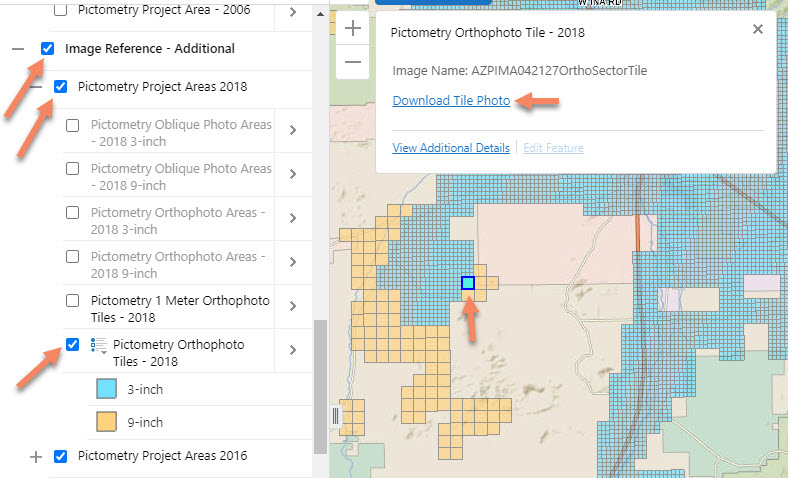
Open the PimaMaps - Survey map, zoom in to your area of interest, and drill down to
Pictometry Orthophoto Tile photos as shown on this annotated screen capture.
Pictometry Project Area maps
|
|
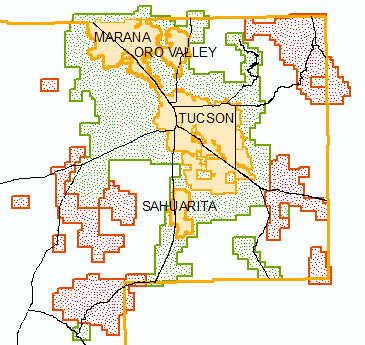
The map to the left shows the Pictometry 2024 project areas in eastern Pima County. The project also includes the Ajo area.
Photos in the green areas are identified as 3-inch resolution. Photos in the red areas have 6-inch resolution.
See "Pictometry Project Area - 2024" on the PimaMaps - Survey Map.
|
We want your feedback and comments.
Please use our
Feedback Form
or contact